What's new in PostSort
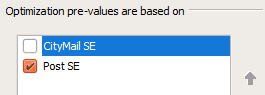
Plus - Preparation
Visa på
svenska
Always feel free to contact our support if something seems
unclear, or if you have additional questions. Phone +46 8 600 37 39 or
support@21grams.com
Version 9.1.0.50 (2026-09-01)
- General
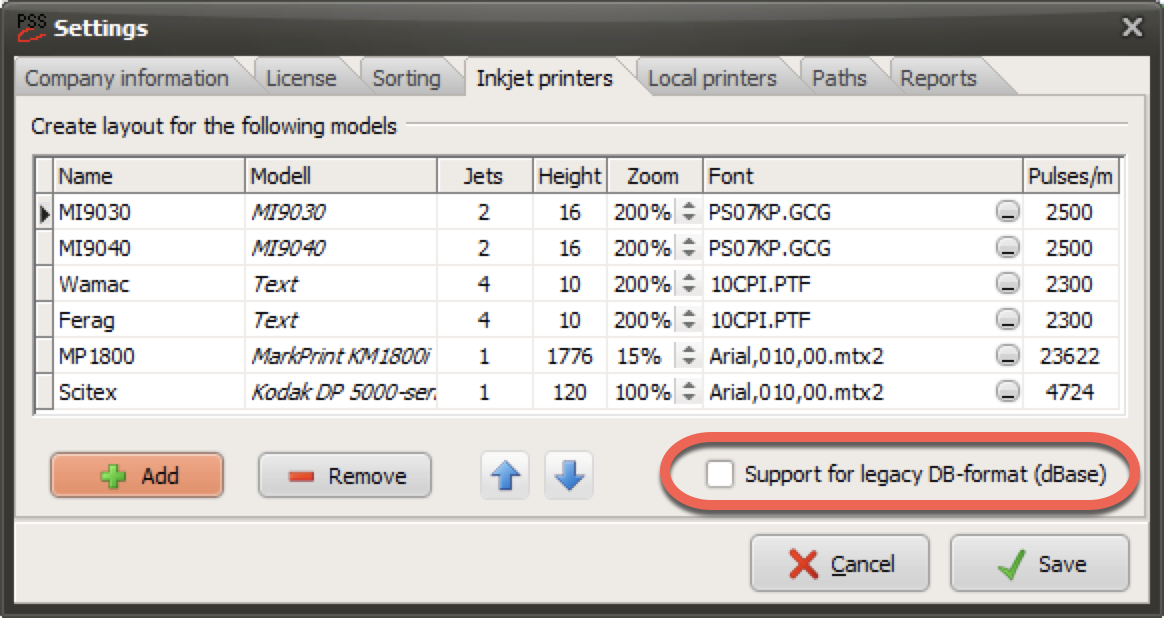
Support for the legacy dBase database format will be discontinued
as of version 9.2. In preparation for this, the following changes are
already being introduced:
The customer database will automatically be converted to the new
format if the dBase format is still in use.
If you are still creating job files in dBase format, you will be
prompted to disable this feature. Please contact our support team if you
know or believe that you will need to continue creating job files using
the dBase format.
The appearance of some dialogs has been slightly updated.
Bug fixes
An issue that prevented some information in the customer register
from being transferred to the dialog has been fixed. The information
will be included in newly created editions, but existing editions will
not be updated. This bug did not occur using the deprecated database
format.
A few minor internal improvements and bug fixes.
Version 9.1.0.48 (2026-05-20)
- General
Version 9.1.0.47 (2026-05-13)
- General
The PostSort service will be moved to a new environment during
the upcoming maintenance window from Friday, May 15 at 17:00 until
Sunday, May 17 at 21:00.
For most users, no changes are required and the service will continue to
operate as normal.
If your company restricts internet access through firewall rules or IP
whitelisting, access to the current IP address 83.140.35.248 must be
replaced with 195.66.94.210 to ensure continued access to the
service.
Bug fix
Version 9.1.0.46 (2026-05-04)
- Post SE
- General
Version 9.1.0.44 (2026-04-13)
- Post SE
- General
Bug fixes
Layout – Mailjet printer
Adding a new field to the layout by double-clicking did not adjust the
baseline correctly. See release notes for version
9.1.0.31
Layout – Join fields
The separate fields did not retain their individual properties for “End
with blank” and “Only upper case”. This is now corrected.
Note! Requires PostSort Production 7.2.0.17 or newer
Postage optimization
Several corner case issues have been solved.
A few under the hood improvements
Version 9.1.0.43 (2026-03-09)
- Post SE
When submitting ADR, Letter Mail and Periodicals with a volume of
100,001 items or more, the shipment must meet the conditions for “Extra
Sorted Shipment.” PostNord now requires that all postal codes are
included in their official postal code file for these conditions to be
fulfilled.
When postage optimization is used, PostSort will handle this
automatically by excluding recipients with unknown postal codes from
“Extra Sorted Shipment.” This will most likely result in a small batch
that is instead submitted as “Daily Mail.”
If postage optimization is not used, or if you do not wish to send mail
to addresses with unknown postal codes, these can now be excluded.
- Layout
Version 9.1.0.41 (2026-02-17)
- Post SE
- General
Bug fixes
Postage optimization – The ”pre-value” was not correct on the
optimization report.
Postage optimization – An error could occurre trying to move a
volume from one distributor to another when Morgonpost was
active.
Post SE – The GS1-Datamatrix data could be missing on
trans-bundles to postage area 10.
A few under the hood improvements
Version 9.1.0.40 (2026-01-26)
- Post SE
PostNord Datamatrix with caret notation, added an initial caret
character to the string. This caret wsa not required, and thereby
removed. However; a new option is added that now includes a leading
caret-character. The reason for this is that some producers will need it
if the caret-character is substituted with a FNC1-character to create a
correct GS1 Datamatrix code.
- General
Version 9.1.0.39 (2026-01-12)
- Reports
- General
Version 9.1.0.38 (2025-12-16)
- Post SE
It is now possible to create PostNord-Datamatrix with caret
notation. This means that instead of the special character FNC1 used in
GS1-Datamatrix, a caret character (^-character) has been placed. If you
can replace the caret character with an FNC1 character in your printer,
the code will be correct.
PostNord allows, as a last resort, that the caret-notated string
is written as a regular Datamatrix. Please get this confirmed by
PostNord before implementing it.
Ex.
^0095611256327249400642010001^40390009^4320123123123^9012345678
- Optimization
- General
Version 9.1.0.37 (2025-11-06)
- General
Version 9.1.0.36 (2025-11-05)
- Post SE / PostNord
Support for PostNord DataMatrix
The software now support the new 2D code PostNord DataMatrix,
which is is about to be launched. The 2D code will initially be used
with Magazines (Posttidningar) and large ADR items. During 2026, paying
postage customers will receive a discount when the code is used.
Learn more at:
https://www.postnord.se/foretag/skicka/reklam-och-tidningar/inrikes-posttidningar/
Generating PostNord DataMatrix codes is currently free
of charge in PostSort Preparation, but will have an increased tick cost
in 2026.
The code data is easily created during the sorting process and
only requires specifying the service and paying customer number.
The code is created automatically during the sorting process and
only requires specifying service and paying customer number.
During sorting, the field Bc2D_ is generated, which should be
printed as a DataMatrix GS1 barcode.
- Layout
IQJET-printer
A new 6-drop font to use when printing 3 lines per jet.
Added support for creating 2D codes. The PostNord
DataMatrix code is not yet tested and approved using the
IQjet-printer. Requires PostSort Production version 7.2.0.7 or
newer.
MP1800-printer
- Rapporter
- General
Bug fixes
Small stability and performance improvements.
A few under the hood corrections.
The TargetOp_ field was not holding any information.
Version 9.1.0.33 (2025-06-27)
- Postage optimizing
- General
Program enhancements
CityMail SE – Now avoids repetition in HN-codes for trans
packets.
‘CM Trans STH-STH’ -> ‘CM Trans STH’
CityMail SE – Detects and warns if incorrect
BundleKey-information is returned by the POP-service.
Bug fixes
Version 9.1.0.32 (2025-05-06)
- General
Version 9.1.0.31 (2025-04-30)
- Layout
Regardless of the printer type for which a layout is created, it
is now possible to double-click a field to include it in the layout.
Subsequent fields are automatically placed below the selected field.
This is true even when the field has a fixed position on the layout. By
holding down Shift, the new field is placed to the right of the selected
field.
Fields can now be selected by using a selection-area as
follows;
| Function |
Name |
Shown as |
Description |
| Left to right |
Window
selection |
Blue solid
line |
Selects only objects that are entirely within the rectangle. |
| Right to left |
Cross
selection |
Green dotted
line |
Selects objects that are entirely or partially within the
rectangle. |
To prevent the layout from being misinterpreted, PostSort now
checks that the fields are loaded in the correct order. If the program
detects that the order is different, a warning will be displayed. It is
then important to check that the layout looks as desired.
- General
Version 9.1.0.29 (2025-03-12)
- Bug fix
Version 9.1.0.28 (2025-01-29)
- Bug fixes
Import templates were not available if an edition was downloaded
locally.
The ‘Delivery note information’ report did not specify zones for
international volumes.
The Summary report did not specify CityMail correctly after
making a postage optimization.
Trying to export the sorted addresses to a dBase file resulted in
an error.
Version 9.1.0.27 (2025-01-07)
- Bug fix
Version 9.1.0.26 (2024-12-09)
- Bug fixes
Version 9.1.0.25 (2024-12-04)
- General
Minor program enhancements
The utility for creating printer fonts, PsMtx2FontUtil version
9.1.0.25, now supports creating fonts also in size 7, 9, 11 and
13.
Version 9.1.0.24 (2024-12-02)
- Post SE
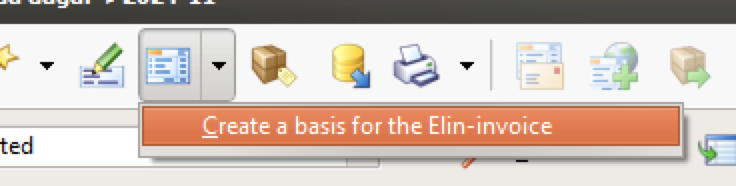
When a shipment is booked digitally through Elin, the
registration process can be simplified by using a so-called "invoice
base." PostSort can now create this base, provided that the run is
price-optimized.
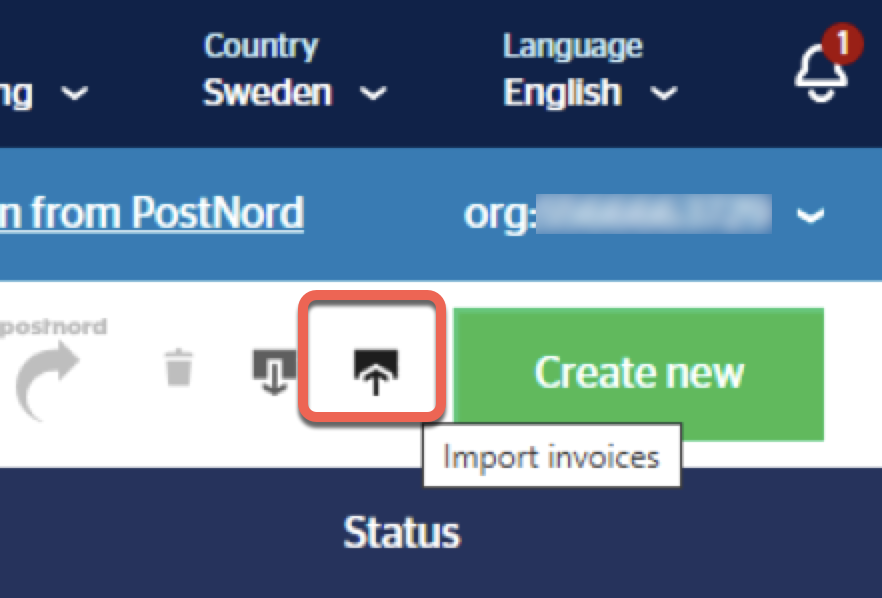
In Elin - Select to import invoices
Customer number and reference is specified in
File->Settings->Sorting->Post SE. For more information; See
PostSort help
https://www.postsort.se/webhelp/US/topics/idh-topic400.htm
- General
Upcoming version
In December, PostSort will be changing its optimization engine.
For you as a user, this won't mean any major changes – the dialogue will
have a new look, and the optimization will hopefully be faster. However,
a significant change is that Norwegian volumes can no longer be
optimized. If you are using the price optimizer for Norwegian volumes,
please contact our support team as soon as possible.
Bug fixes
Layout, MP1800-printer
Layout – When loading a layout, fields could under certain
circumstances be arranged in the opposite order from how the layout was
created.
Ex. [Country] [City] [Zipcode] instead of [Zipcode] [City]
[Country]
Export to file – If no valid addresses existed, then even the
files containing invalid and multi-ex records would be empty.
Version 9.1.0.21 (2024-10-21)
- Layout
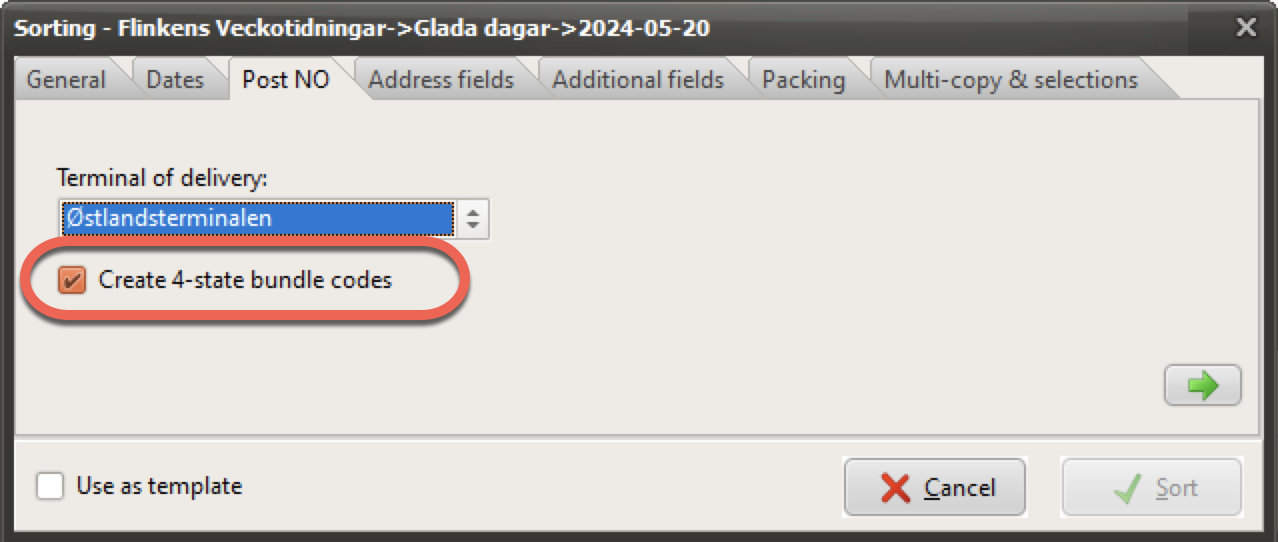
These new features are also available in PostSort Preparation.
Enable support for long field names by turning off support for legacy
DB-format. Setting is found via File->Settings->Inkjet
printers

Text based layouts - When fields are moved they will now
automatically be character aligned on the x-axis. This means that they
always end up in the right position and thus avoid differences between
the layout and the resulting printout/export.
- General
Version 9.1.0.20 (2024-09-23)
- General
Version 9.1.0.19 (2024-09-02)
- Post NO / Bring
Bring make changes to their terminal structure for bundles
2024-09-01. This will affect how PostSort creates
containers/pallets.
4-state field, to replace topsheets, is now included when
addresses are exported to file(s) provided that it was created. Field is
named ‘PacketBc_’
- General
Version 9.1.0.18 (2024-06-20)
- General
Version 9.1.0.17 (2024-06-20)
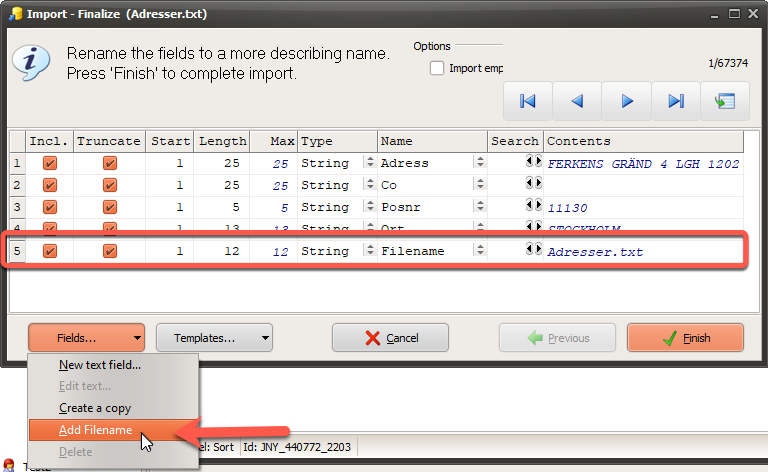
- Import
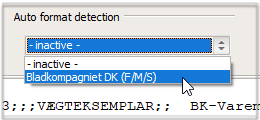
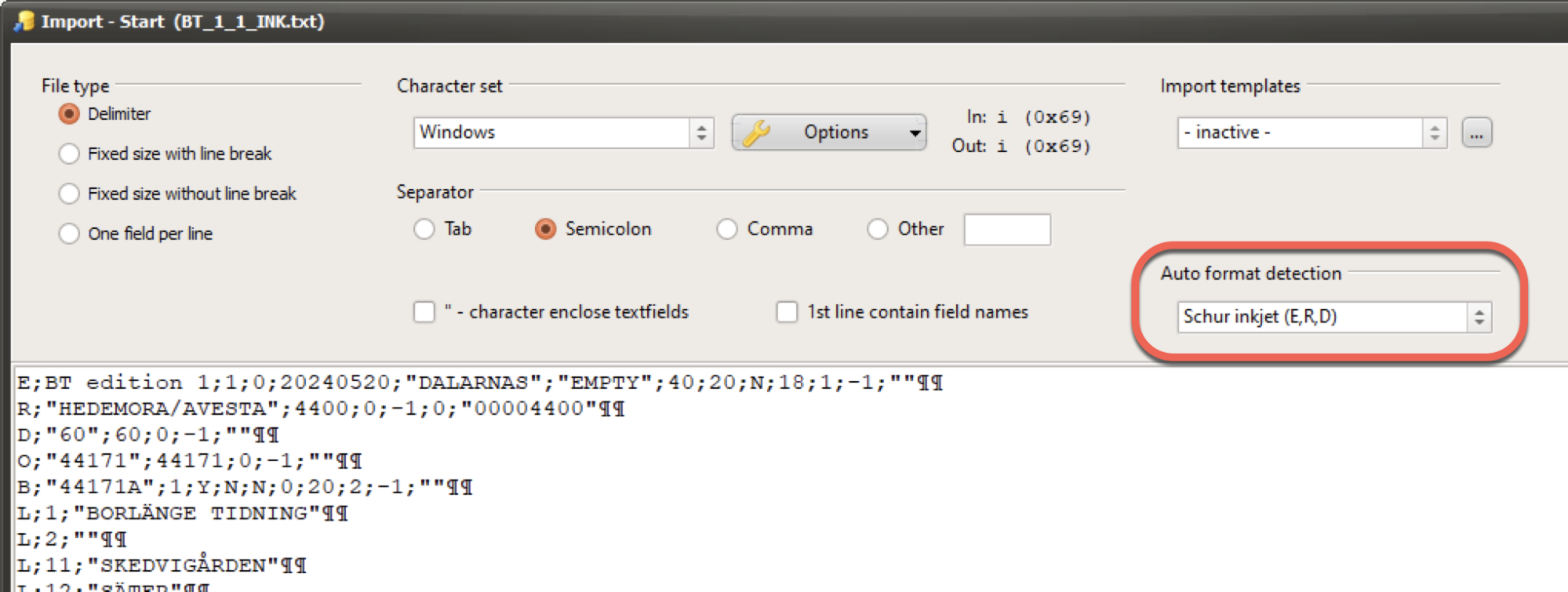
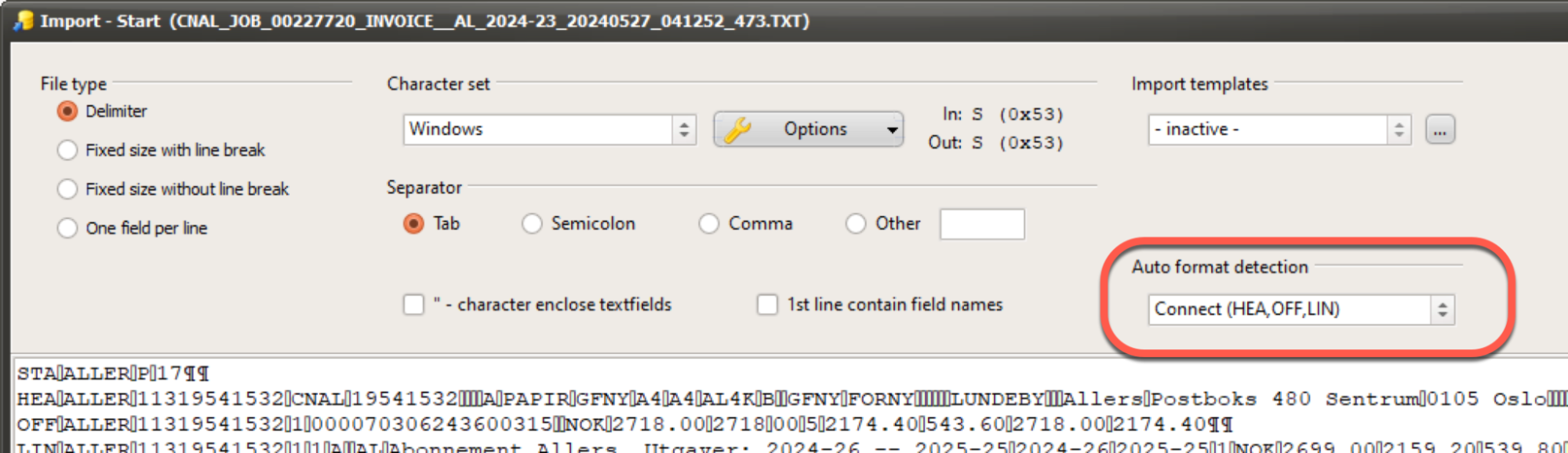
Auto format detection - PostSort is making it possible to import
special address formats. This function has existed for a long time. In
earlier versions users had to select the format manually, but from this
version on it will be selected automatically.
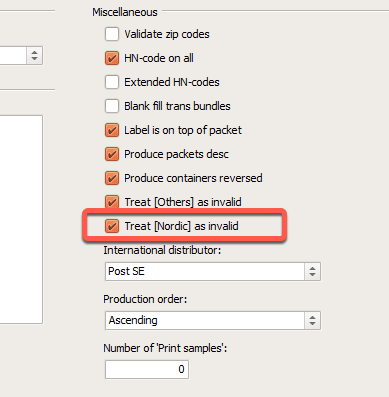
PostSort is now able to import inkjet-files formatted for Schur
Packaging Systems (E,R,D-format).

- General
Version 9.1.0.16 (2024-05-27)
- General
Version 9.1.0.15 (2024-05-20)
- Import
To simplify importing of files with an included header line, the
field names will now be validated and possibly adjusted automatically
before they appear in the final import step. Ex. 'First Name' is
automatically changed to 'First_Name' as spaces are not
accepted.
Address fields must no longer end with an underscore, as PostSort
handles these fields differently. Ex. ‘FirstName_’ is changed to
‘FirstName’
- Post NO
- General
Version 9.1.0.14 (2024-04-16)
- General
Version 9.1.0.13 (2024-03-27)
- General
Version 9.1.0.12 (2024-03-18)
- Post SE
- General
Version 9.1.0.11 (2024-02-29)
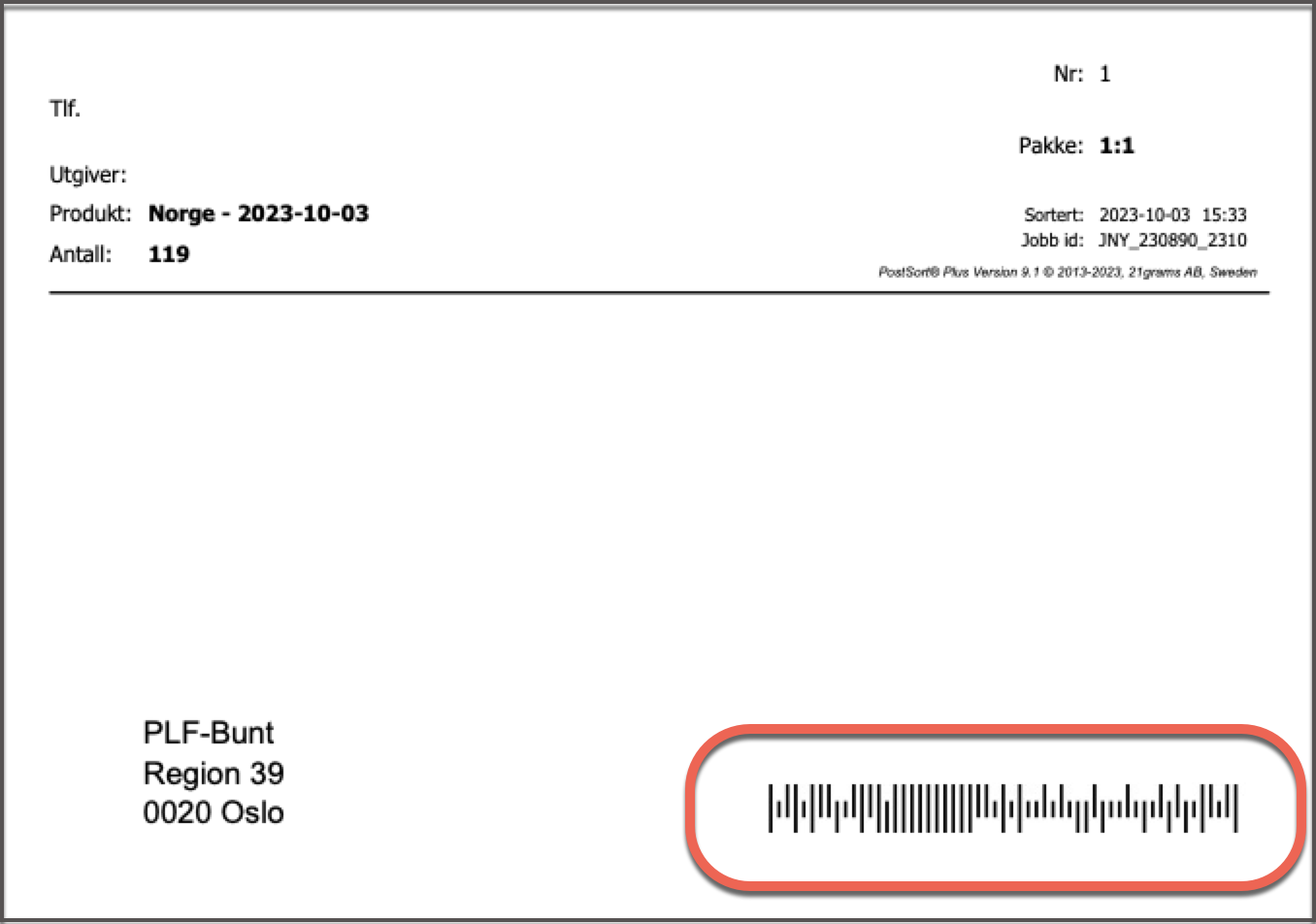
- Post NO
|
Old format |
New format |
| HN1_ |
HN2_ |
HN1_ |
HN2_ |
| Zipcode |
1766 |
Lokal |
BUNT |
1766 |
| Region |
Trans |
39 |
BUNT |
REG 39 |
| Terminal |
Region |
00-79 |
BUNT |
REG 00-79 |
| Distributor |
Posten NO |
00-99 |
BUNT |
DIV |
| International to the same country |
Posten NO |
00-99 |
BUNT |
UTL DK |
| International to more than one country |
Posten NO |
00-99 |
BUNT |
UTL DIV |
- General
Version 9.1.0.10 (2024-01-11)
- General
Version 9.1.0.9 (2023-12-27)
- General
Version 9.1.0.8 (2023-12-22)
- Post SE
Version 9.1.0.7 (2023-12-15)
- Post NO
Version 9.1.0.6 (2023-11-30)
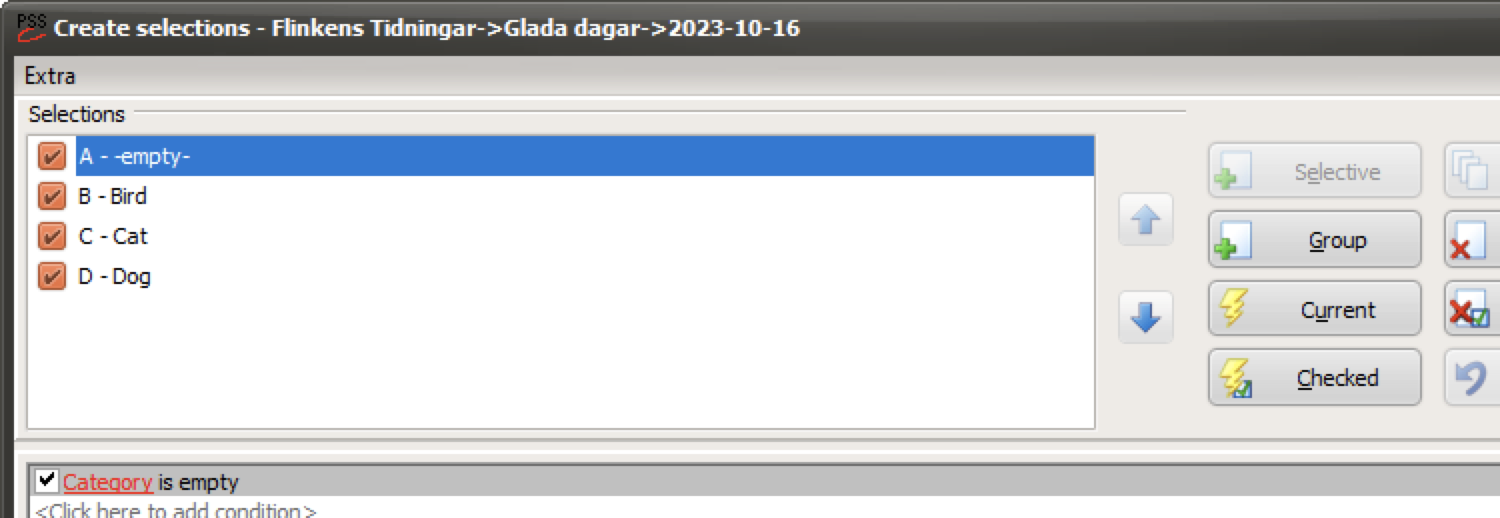
- Selection
- General
Version 9.1.0.2 (2023-10-13)
- General
Version 9.1.0.1 (2023-10-12)
- Sorting
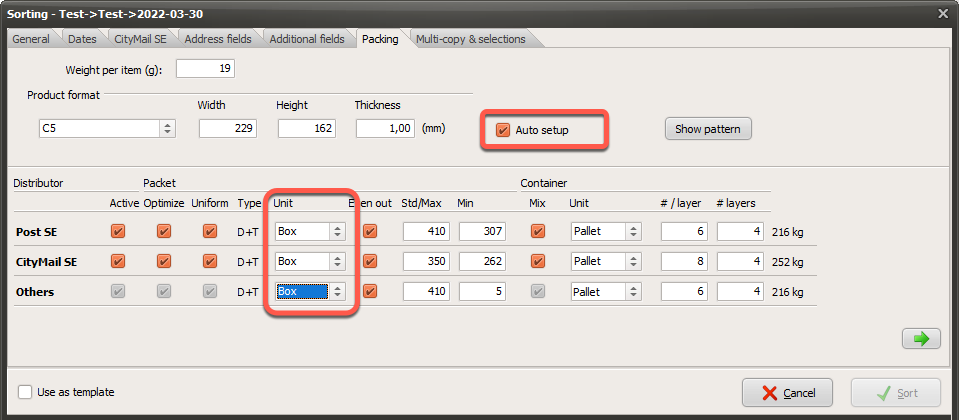
Auto setup using bundles has been updated to get a better result.
But to benefit from it we must remember to set the correct size and
weight of a product.
Round-to
PostSort will now round min/max bundle size to the nearest 5-boundry. So
if the boundaries are 32-89 copies, PostSort will set 35-85. The
“round-to” value is default set to 5, but can be modified.
Containers without side-support (like EUR-pallet) will invoke how
PostSort calculates the size of bundles.
See PostSort help file for more in-depth information.
https://www.postsort.se/webhelp/US/index.htm?context=30005
Bundle min size
The smallest size of a bundle used to be 25mm, and is now according to
table;
| Post SE |
50mm |
|
Post NO |
40mm |
| CityMail SE |
50mm |
|
HeltHjem NO |
25mm |
| Morningpost SE |
40mm |
|
Post DK |
40mm |
| Post FI |
40mm |
|
Post IS |
40mm |
- Post NO / Bring
- General
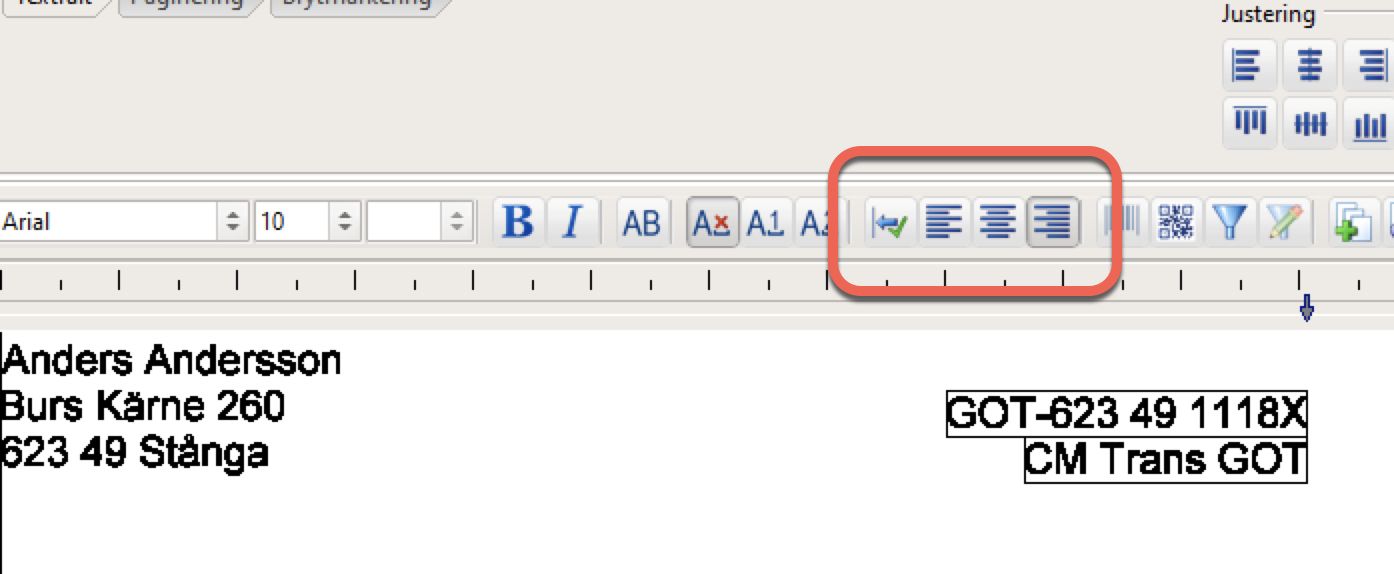
Process files locally
Today many of our users save their customer data on a common server in
order to be able to share and back up the information. Are you one of
those and experiencing slow processing of the files? Choose to work with
them locally, and upload them back to the server when you're done.
Bug fixes
The customer database is now using the newer database format by
default.
The development platform for PostSort has been updated.
Version 9.0.0.21 (2023-08-07)
- General
Version 9.0.0.20 (2023-06-13)
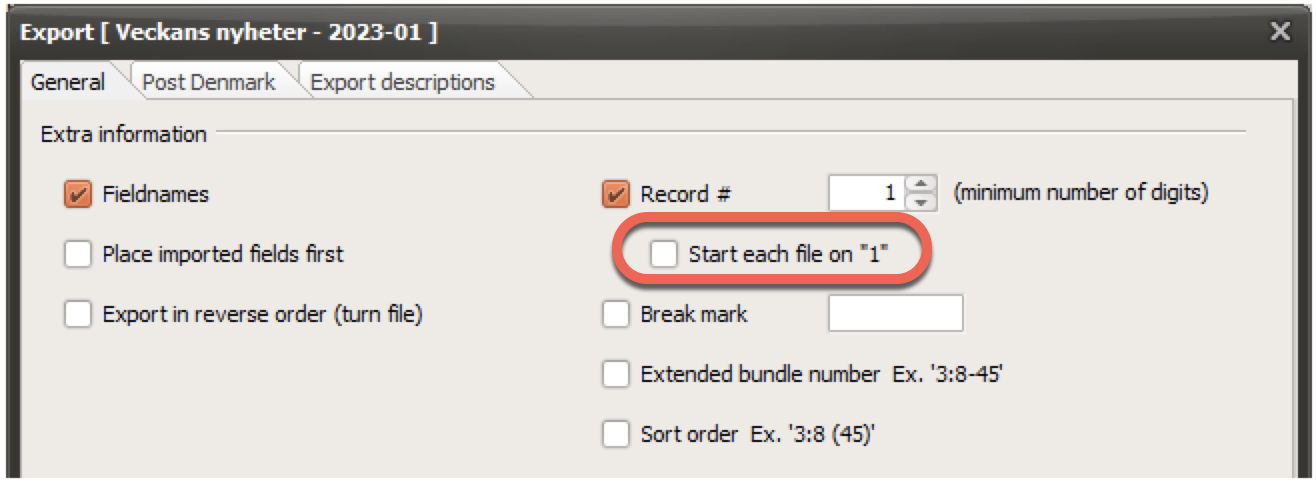
- Export
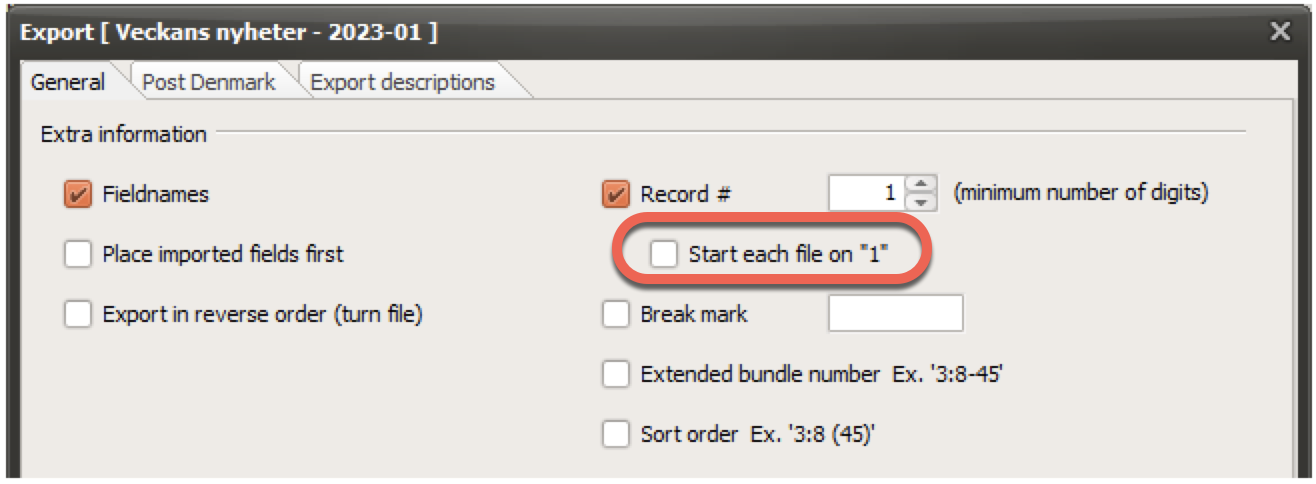
New option - Start each file on “1”.
In previous versions, the record number has always been related to the
record number in the “production table”. If you would like each created
file to start on “1”, you can now do so by selecting this new
option.
All new created Titles will have this option set by default. Existing
ones will preserve their old value (which is unselected).
- General
Bug fixes
Selection-information was wrongly cleared if additional files
were imported after defining selections. Definitions and assignments are
now kept.
A reference is automatically created when making a postage
optimization with postage from 21grams. This reference was not correctly
formatted when used with tax reduction (6%).
If an export description was selected on the “Export description
tab”, it was used even if the tab was not active.
Version 9.0.0.19 (2023-05-15)
- General
Version 9.0.0.18 (2023-04-28)
- General
Version 9.0.0.17 (2023-03-03)
- CityMail SE
Government Framework Agreement is renamed from ‘2015-04-01’ to
‘2020-12-13’.
Region Mälardalen (MLD) is no longer a part of region Stockholm
(even if they are located in the same building), so the terminal
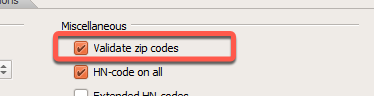
structure for CityMail has been modified. Please make sure to force a
validation of zipcodes if re-sorting an “old job” including volumes to
CityMail.
- Post NO
- General
Version 9.0.0.16 (2023-02-15)
- Layout – MP1800i
-Reports
- General
Version 9.0.0.15 (2023-01-18)
- Sorting
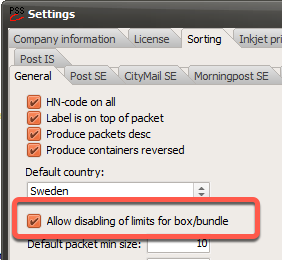
It is now possible to override limits for bundles and boxes set
by the different distributors, and assign greater values.
Note! To avoid accidental activation, this function needs to be enabled
in the program's general settings.
- Reports
Production report
The simplified report now includes a summary line per group.
Box labels
The report will no longer print the service speed for distributor
Morgonpost.
Container report
If an international distributor is selected, the program will now
produce container sheets for these pallets as well.
- General
Bug fixes
Bladkompagniet DK
If PostSort was set to Norwegian, default field names became wrong when
importing an FMS file from Bladkompagniet..
Sorting – If the product thickness was assigned a too small value
compared to its real thickness, bundles and boxes might end up being too
heavy. By monitoring the total weight, PostSort will now ensure that
this doesn’t happen.
Due to issues with Windows 11 version 22H2, a different dialog
for selecting a destination folder is now being used. This will solve
the problem with being unable to select a destination folder other than
the ones found on the desktop.
CityMail SE – An error occurred during the sorting process if
volume was big enough to create a container where all copies had the
same zip code.
Solves an optimization problem that occurred when processing
Swedish addresses with some additional international
recipients.
The box-label-report will no longer include service speed A/B for
Morgonpost.
Version 9.0.0.13 (2022-11-11)
- Rapporter
- General
Program help is now available in English. Press the F1-key to
launch the help system while in PostSort. We will focus on making it
even better in the coming months. Try it! Press F1 in any dialog, and
you will have instant help.
Minor program enhancements
Tools->Modify sorting tables
Will now start with B-Post selected
Duplicate check - Increased write speed when saving changes made
by the user.
Statistics-information - Optimized reading of
information.
Product thickness less than 0.1mm is now accepted by PostSort,
but has to be enabled. Please contact our support to enable it if
required.
Price optimization engine has been updated to version 1.2.22, and
will now support volumes that can not be price evaluated. (As when using
Ascendia as an international distributor).
Increased performance for users sharing the same customer
database files.
Bug fixes
CityMail SE - Boxes were produced in the wrong order when using
‘free boxing’, and the container was optimized for the delivery
terminal.
Xml-files - Multi-byte characters were encoded wrong using
UTF-8.
Several minor fixes.
Version 9.0.0.12 (2022-09-19)
- Import
- Post DK (PostNord Denmark)
When the ‘Sortert Magasinpost’ is used, then Post DK will
pre-process the addresses before they can be used for printing. PostSort
can now aid in importing ‘Utgiver 2 format’-files.
Sorting algorithm for ‘Sortert Magasinpost’ is updated to better
handle addresses marked to “Direction N”.
- Posten FI / Posti – Posti Sorting Service
- Layout – MP1800i
Version 9.0.0.9 (2022-06-27)
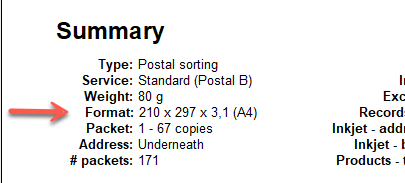
- Sorting
It is now allowed to adjust the product thickness after running a
postage optimization. This will enable setting up the desired packet
sizes for bundles and boxes.
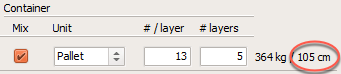
The height from bundles/boxes are now declared along with the
weight of a container. Note that the height of the container itself is
not included. So the total height in the example below will be 105 + 15
= 120cm.
- General
Version 9.0.0.8 (2022-05-24)
- General
Version 9.0.0.7 (2022-05-03)
- Import
- Sorting
Up to now “Auto setup” of packing was only supporting bundles.
This is no longer true, and PostSort can now aid in optimizing packaging
when using boxes.
Note that PostSort now will limit maximum size for bundles and boxes
even when “Auto setup” is de-selected. This is done to avoid making
mistakes.
Post FI (Posti) - Support is now added for all types of
containers used with Posti.
BA - Smart Ark (boxes only)
BE - EUR pallet (boxes and bundles)
BF - FIN pallet (boxes and bundles)
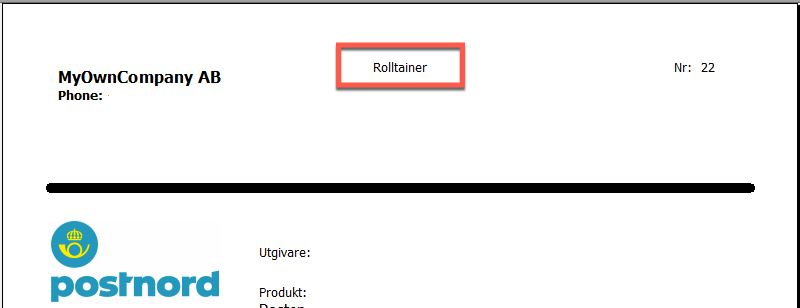
BG - Shop pallet (boxes and bundles)
BL - Rolltainer (bundles only)
BR - Cage (boxes and bundles)
Rules for the [Others]-distributor is now based upon which
distributor is selected for handling international items. So if CityMail
is selected to do that; then the size for a box will be set to the size
of a CityMail-box in the calculation.
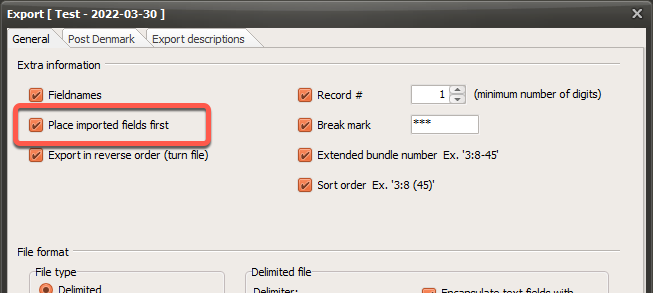
- Export
PostSort-specific fields have always preceded customer fields
when exporting addresses to a file. It is now possible to select if the
customer fields are to precede the PostSort-generated ones.
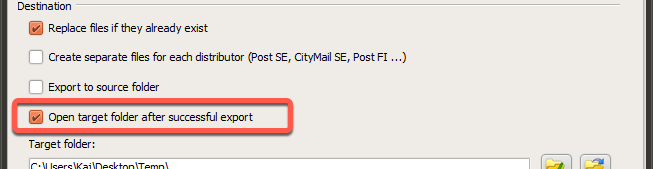
PostSort can now be instructed to open the target folder after a
successful export.

- General
Version 9.0.0.6 (2022-03-18)
- Morgonpost SE
- CityMail SE
- Helthjem NO
It is no longer mandatory to do a Postage Optimization to be able
to use Helthjem. So if postage is bought directly from Helthjem and no
price agreements are available, then you can go directly to sortation
after importing the addresses.
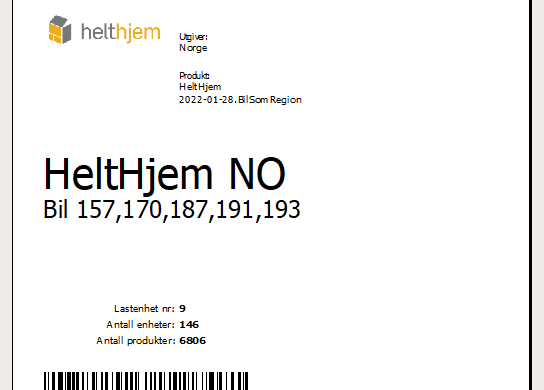
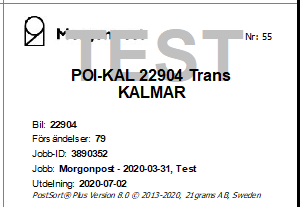
Truck numbers (Bil) are now included on the container
labels.
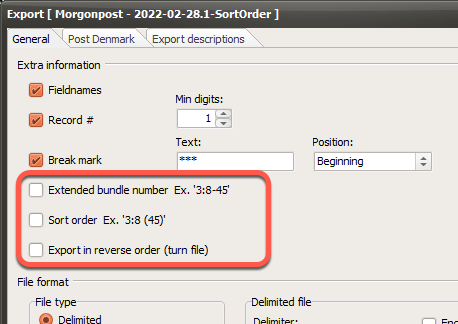
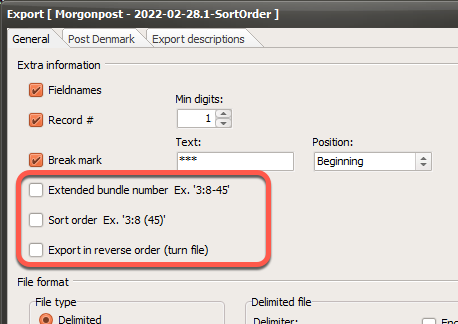
- Export
New option: Extended bundle number
This will replace the ‘bundle number’ with an extended one. The bundle
number information will then be added to all records, and will include a
‘remaining products’-value.
Example; 3:7-23 (Pallet 3, Bundle 7, 23 items remaining)
New option: Sort order
This field is similar to extended bundle number, but will indicate the
order for each product in the finished bundle/box. Example; ‘3:7 (7)’
which is read Pallet 3, Bundle 7, Position 7. So regardless of how the
products are produced (address down or up) this field will indicate how
the final bundle has to be sorted. Starting with (1) on the first
product.
New option: Export in reverse order
It might be required to reverse the order in which the addresses are
printed. This would be the case if printing is done in an early step of
the production process. Like when using a roll at the end of a digital
printer, and in the next step use a “roll to sheet” solution.
- General
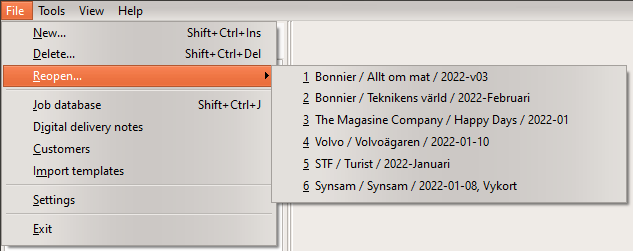
Reopen last used editions…
It is now easy to reopen a recent processed edition by selecting File
-> Reopen… from the main menu. Note that this will only include your
own recent processed editions, and not your coworkers. This list will
start off empty, and will hold up to 9 editions.
Version 9.0.0.4 (2022-01-25)
- General
Version 9.0.0.3 (2022-01-18)
- General
Version 9.0.0.2 (2022-01-13)
- General
Version 9.0.0.1 (2022-01-12)
- Sorting
Post SE / PostNord are no longer offering the product
‘Publication/Posttidning - Within Nordic Countries’. This means that
these copies need to be wrapped in plastic or put in an envelope, and
handled separately in the same way as products to other countries.
For users of PostSort Production (or inkjet controller) the simplest way
is to handle this volume in the same way as you do with other
international recipients. So if you are using a local printer to produce
labels for those, then you are now able to do the same with addresses to
the nordic countries.

- General
Version 9.0.0.0 (2021-12-07)
- General
- Import
- Helthjem NO
Version 8.0.4.66 (2021-09-09)
- General
Version 8.0.4.65 (2021-06-21)
- General
Version 8.0.4.64 (2021-05-27)
- Post FI / Posti -- Sorting Service
- General
Version 8.0.4.63 (2021-04-13)
- General
Version 8.0.4.62 (2021-04-06)
- Post FI / Posti – Sorting Service
- General
Version 8.0.4.59 (2021-02-04)
- General
Version 8.0.4.58 (2021-02-02)
- General
Bug fixes
Post SE / PostNord – An error was displayed when trying to
view/print the summary report.
Post SE / PostNord – Files sorted in version 8.0.4.57 will state
’Extra sorted’ om volumes to distributor. This is wrong.
Version 8.0.4.57 (2021-02-01)
- Post SE / PostNord
Optimization now support product ‘Extrasorterad sändning
Låg/Normal’
(Extended sorted shipment Low/Normal).
New destination for trans-bundles and boxes for region 10-15.
These are now sent to Årsta, and not to Rosersberg. Containers with
‘direct-bundles’ are still sent to Rosersberg.
- Inkjet-printer
- General
Version 8.0.4.56 (2020-12-30)
- Sorting
Version 8.0.4.55 (2020-12-07)
- Morgonpost SE
- Inkjet-layout
- General
Version 8.0.4.53 (2020-10-14)
- General
Version 8.0.4.51 (2020-09-30)
- Post FI / Posti – Sorting Service
Support for Discount Code as a field in the address file.
Normally you enter a Discount Code for the entire shipment. End of
discussion!
This function is thus only needed in exceptional cases, such as when
chasing new subscribers to a magazine, and we can’t process the file
separately because it does not reach the minimum number of items for the
specific service. What we now make possible is to append several files,
and add the discount code already when importing the addresses. Contact
PostSort Support or Posti directly for more information.
- Post NO / Bring
- HeltHjem NO
- General
Version 8.0.4.50 (2020-08-25)
- Post FI / Posti – Sorting Service
Version 8.0.4.49 (2020-08-18)
- Post FI / Posti – Sorting Service
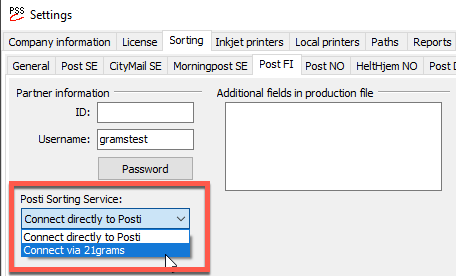
It has previously been difficult for some users to meet the
requirements of having a static IP-address to Internet to be able to
access ‘Posti Sorting Service’. Now it is possible to connect to Posti
via 21grams, and thereby avoid that problem.
Set desired connect method via;
File->Settings->Sorting->PostFI
PostSort now support the possibility of Posti assigning a
non-standard text in the field SortInfo_ (Payment Tag) of some
addresses.
Posti is currently only doing this for product 12841 (Posti Daytime
Publication Delivery).
- Sorting
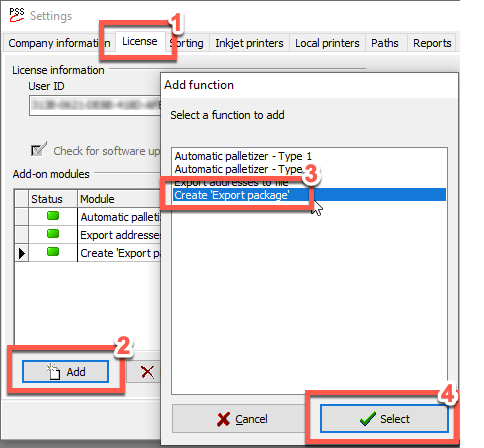
- Export package
This function makes it easy to gather exported address files and
the desired reports in a zip file, for further distribution to the
production unit.
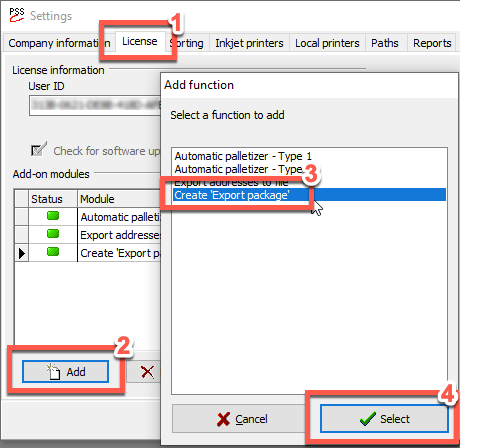
Activate the function via; File->Settings->License->Add-on
modules->Add
Create export package via speed button or via menu item
Misc->Create an export package (.zip-file)
Version 8.0.4.48 (2020-06-22)
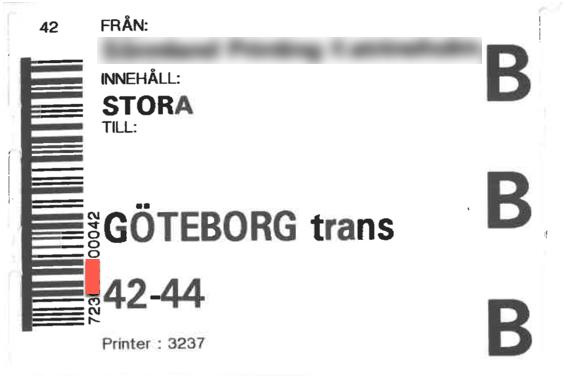
- Post SE
It is now possible to include a barcode on box and container
labels for PostNord. The barcode includes your partner ID, and can
either be unique to you or be common to several producers. If you are
unsure of your partner ID; it can be found on existing box labels from
PostNord. Extract the digits in position 4-7 by the barcode. Ex.
723xxxx00042
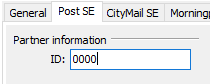
In PostSort;
Start PostSort
Select File->Settings->Sorting->Post SE
Insert your Partner ID (4 digits)
Next time you sort a file for Post SE, barcodes will be included
on the container and box labels.
Note! No barcode will be generated for destination ’Posten SE /
10-98’
- Morgonpost SE
- General
Version 8.0.4.46 (2020-05-29)
- General
Version 8.0.4.45 (2020-05-18)
- General
Version 8.0.4.43 (2020-04-08)
- General
Version 8.0.4.42 (2020-03-20)
- General
Version 8.0.4.41 (2020-03-09)
- Sorting
PostSort now support distributor unique containers. Previous
versions offered Pallet, Cage and Sack and these were selectable for all
distributors. From now on PostSort will only present containers
available for each distributor, and this list has been updated to
include new types. If you are missing any, then please get back to us so
we can add it to future versions of PostSort.
Example of added containers are:
Post SE
CityMail SE
Posten FI
Posten NO
- Post FI / Posti – Sorting Service
- Reports
- General
Version 8.0.4.39 (2020-02-11)
- Bypost NO
PostSort now supports Bypost in Norway. They provide favorable
prices for envelopes and ’small formats’ (MV1 and MV2). Please contact
21grams or Bypost for more information.
Support for Bypost when calculating prices (postage
optimization).
- Post FI / Posti
- General
Version 8.0.4.37 (2020-01-10)
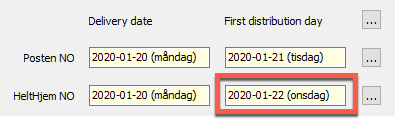
- HeltHjem NO
Now support change in distribution start.
Distribution starts 2 days after delivery day when;
Distribution starts 3 days after delivery day when;
Delivery no later than 2:00 pm on delivery day. If shipment
arrives later, then next day will be considered ‘delivery day’.
Observe that ’First distribution day’ might get adjusted if
settings on HeltHjem-sheet are modified.
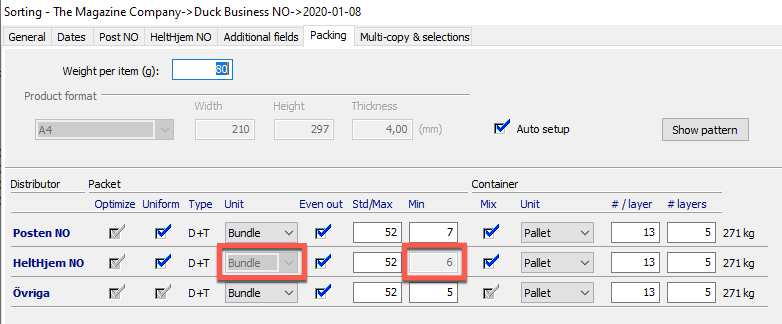
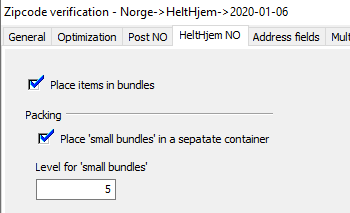
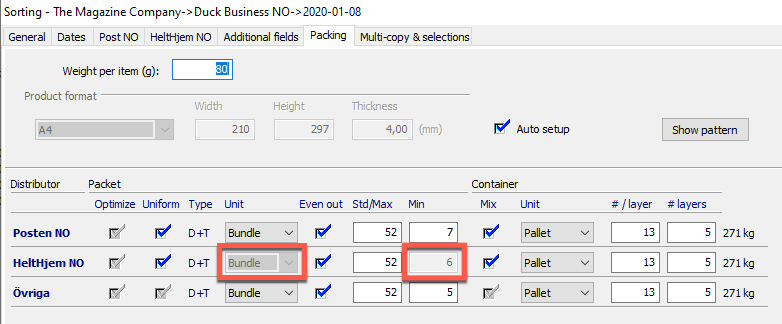
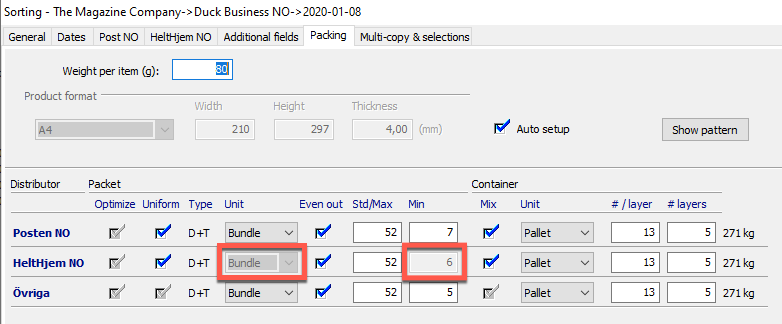
There is now support for moving all small bundles to a separate
container which will be produced first.
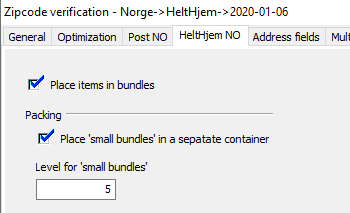
The level for moving bundles can be adjusted when the product is
sorted, but it is not possible to change if the products are to be
bundled or boxed. Note that the level affects the settings on the
'Packing' tab.
- General
Support for 2020
Program enhancements
Bug fixes
Version 8.0.4.34 (2019-12-05)
- Post FI / Posti – Sorting Service
Change in product range from 2020-01-01. (+19193, -12899,
-19226)
Support added for distribution speed 04 (4 days).
The method for calculating pallet size has changed. This should
mean that the result from Posti is more in line with the settings made
in PostSort.
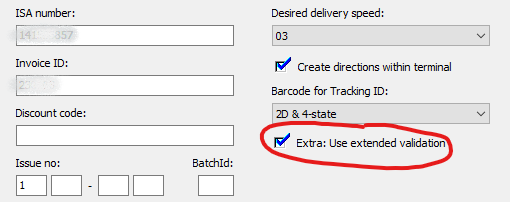
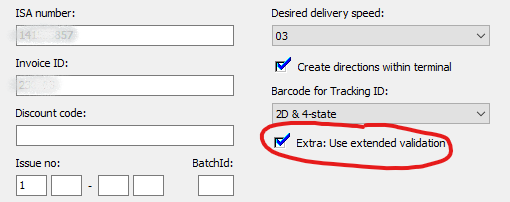
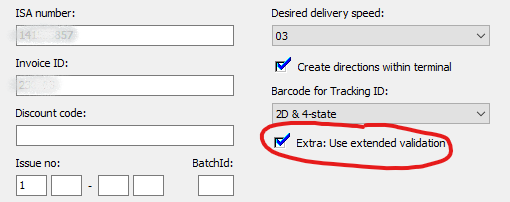
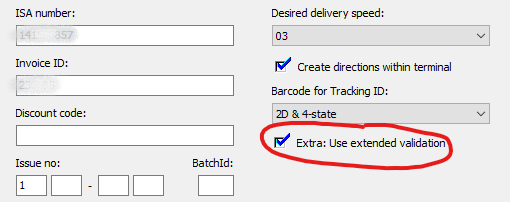
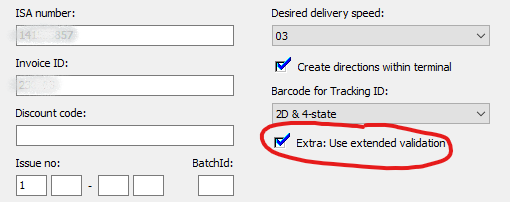
Error messages from SortingService can sometimes be difficult to
interpret. Therefore, it is now possible to specify “extended
validation”, where a more detailed error message is returned.
- General
Version 8.0.4.33 (2019-11-04)
- General
Bug fixes
An error was reported when trying to start optimization including
Morningpost SE.
Only one print sample was added to production file.
Kodak DP5 (Scitex) – Layout
A textblock became empty if it was moved on the layout.
Version 8.0.4.32 (2019-10-29)
- Sorting
It is now possible to specify that a product is ‘Machine
suitable’ when product size is about the same size as a C5. This doesn’t
have any effect for the moment but will in upcoming releases.
Added S65 to list of known formats
- Morningpost SE / Morgonpost
- Post FI / Posti
- Export
ZipChange_ -- Changed behavior. Field will now indicate last
product within a group, and not as previously on first product. Note!
ZipChange field is used when putting products in boxes, and you are
required to indicate groupings within the box (as for
HeltHjem).
- General
Version 8.0.4.31 (2019-10-08)
- General
Improving speed and stability when writing information to
disk.
HeltHjem NO – The optimization dialog didn’t assign any volume to
HeltHjem even when ”Full allocation” was selected.
HeltHjem NO – Boxes were not created on the correct
levels.
Bug fixes.
Version 8.0.4.30 (2019-09-18)
- Inkjet-layout (Printers.dll 8.0.4.30)
Customers have reported corrupted layout files when saving files
on a network share. An attempt to solve this problem is now made.
Layouts are now also read and written to disc much quicker.
Bug correction; If a ZipChange-layout-field was moved/relocated
on the layout, it was then converted to a Break-field. This is no longer
the case.
Version 8.0.4.28 (2019-09-10)
- General
Version 8.0.4.27 (2019-09-05)
- MTD SE
- Post FI / Posti
- Post NO / Bring
- HeltHjem NO
- Inkjet-layout
- Reports
- Export
- Export to a new edition
- General
Version 8.0.4.26 (2019-06-19)
- Post FI / Posti
Version 8.0.4.25 (2019-06-13)
- General
Version 8.0.4.24 (2019-06-05)
- General
Version 8.0.4.23 (2019-06-04)
- Sorting
- CityMail SE
- MTD SE
- HeltHjem NO
As of August 1, 2019, sorting for HeltHjem will be charged with a
higher amount (up to 0,024 euro per address). More information will be
sent out separately.
Support for box-sorting
PostSort now gives you full support for using boxes with
HeltHjem
Updated HN-codes when using boxes
Support for printing box labels
The ZipChange_ field (in exported file) now indicates when to
create a bundle within the box. Please contact our support for more
information.
- Reports
Summary report – Delivery date and distribution start are now
specified for all distributors on the report.
Container report – It is no longer possible to modify the dates
on the report, and dates set during optimization/sorting will be used.
It is however possible to decide if the dates should be printed on the
report.
- Inkjet layout
Version 8.0.4.21 (2019-04-05)
- Import
- General
Version 8.0.4.20 (2019-04-04)
- CityMail SE
- General
Version 8.0.4.19 (2019-03-27)
- CityMail SE
Postage optimization – Order reference assigned for CityMail
before entering into the postage optimization, is now replaced if
postage is supplied via 21Grams. The information will reflect what is
assigned as ‘Invoice reference’ when leaving the optimization
window.
Sorting – Support is added for using the returned POP-codes for
sorting CityMail addresses. This is still in test mode and can be
activated per user. More information will be published when released to
all users.
Notification – Job reference sent to CityMail Partner web now has
the following format: ‘Titel->Edition’.
- Easy2You NO (Norpost)
- HeltHjem NO
PostSort now states that delivery to HeltHjem must take place 2
days before the start of distribution. Previous version stated 1
day.
It is required to put envelopes in boxes when using HeltHjem.
Each district has to be bundled using a rubber band. To aid this
procedure PostSort now indicate a district change within a box using the
ZipChange_ field.
(Applies only when addresses are exported to text files)
Box labels can now be produced via box-label-report.
- Sorting
- Export
HeltHjem NO – The exported fields ZipChange_ will now indicate when a
district change appears in a box. This information can be used is
selected
- General
Version 8.0.4.17 (2018-12-17)
- General
Version 8.0.4.16 (2018-12-12)
- General
Version 8.0.4.15 (2018-12-10)
- Post FI / Posti
Support for new zones. Urban/non-urban is replaced with zone
A,B,C and Åland.
Support for new products 2019.
Support for new distribution speed; 5 days.
- General
Version 8.0.4.14 (2018-11-06)
- Post NO / Bring
Zipcode verification
Postage optimization
Sorting
- Bladkompagniet DK
- Printing address labels
- General
Version 8.0.4.13 (2018-10-17)
- Layout
- General
Version 8.0.4.12 (2018-10-15)
- General
Version 8.0.4.11 (2018-10-04)
- Postage optimization
- Sorting
- Layout
- General
Version 8.0.4.10 (2018-09-07)
- Post NO / Bring
Version 8.0.4.9 (2018-09-03)
- Post NO / Bring
Version 8.0.4.8 (2018-09-03)
- Post NO / Bring
- General
Version 8.0.4.6 (2018-08-01)
- Zipcode validation
- General
Version 8.0.4.5 (2018-07-06)
- General
Version 8.0.4.4 (2018-06-27)
- New instruction videos
- General
Version 8.0.4.2 (2018-06-05)
- Send edition to PostSort Helpdesk
- General
Bug fixes
Created selections were not handled correctly when exported to a
new edition.
International addresses were not handled correctly when not sent
via Post FI, even though Posti Sorting Service was in use.
Version 8.0.4.1 (2018-06-04)
- Post FI / Posti
- General
Bug fixes
A new optimization has to be made when an addresses are exported
to a new edition. This was the case when HeltHjem NO were
selected.
An error message was displayed when running in off-line mode.
This is now corrected.
And more…
Version 8.0.4.0 (2018-05-24)
- GDPR
On May 25, 2018, the new General Data Protection Regulation
(GDPR) will be applied in the EU / EEA. In short, the new legislation
means that we who process personal data for others must help those
responsible for personal data to comply with the regulatory framework.
Personal data is all information that can be used directly or indirectly
to identify a unique individual. For more information about the new data
protection regulation, please see the information provided here
PostSort has a new function to aid users in the process of
removing old files. These can be assessed via:
Tools->File removal (GDPR)
PostSort is setup to remove files older than 90 days, and this
function will be activated automatically once a week.
Do you want to apply different rules? Change settings via:
Tools->File removel (GDPR)->Settings
- Sorting
Better support for files where information is moving between
fields. Let’s say you have an address file with 5 columns. Not all
addresses have that much information, so for some addresses zipcode will
be placed in column 3, and for others in column 4, and so on. PostSort
now gives you the possibility to specify the address fields as a
layout.
- General
Version 8.0.3.14 (2018-04-06)
- Post FI / Posti
A warning will now be issued if discount is about to be lost when
product 18155 and 18156 are used in conjunction with
PostiSortingService. This happens when ISA mode is set to 'Use existing
ISA'.
New tracking service when using PostiSortingService.
Posti can now generate codes to use with their tracking service. Contact
Posti at lajittelupalvelu@posti.com
for more information.
Generated codes will be found in the exported field TrackID_. This is
the same field used by Norpost and 21grams when generating tracking
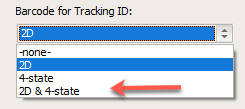
codes. Posti can generate print-data for the following codes:
Data Matrix 2D (16x16 or 8x32 dots)
4-state (42 bars). Can be added to the layout in PostSort for
printers from Markem-Imaje och Domino, and then be printed with our
inkjet controllers.
- Norpost NO
- General
Version 8.0.3.13 (2018-03-14)
- Citymail SE / Bring Citymail
- HeltHjem NO
- General
Version 8.0.3.12 (2018-03-12)
- HeltHjem NO
- General
Version 8.0.3.11 (2018-02-27)
- General
Version 8.0.3.10 (2018-02-26)
- General
Version 8.0.3.9 (2018-02-17)
- General
Version 8.0.3.8 (2018-02-13)
- Citymail SE
All areas are now available without using POP, but over 70.001,
POP must be used. However, we recommend using the POP service on all
jobs.
- General
Version 8.0.3.6 (2018-02-07)
- General
Version 8.0.3.5 (2018-02-06)
- Citymail SE / Bring Citymail
- Post FI / Posti
- General
Version 8.0.3.3 (2018-01-25)
- Edition window (job window)
- Citymail SE
- Post DK
Version 8.0.3.2 (2018-01-14)
- Post FI / Posti
- Post DK / PostNord
- General
Version 8.0.3.1 (2018-01-07)
- General
Version 8.0.3.0 (2017-12-27)
- Post NO / Bring
Express and Standard delivery (A-Post and B-Post) is replaced
with a 02-service (delivery in 2 days). Process files in PostSort using
Standard/B-Post.
Support for new packaging rules for bundles. Volumes to Tromsø
and Bodø are to be put in separate containers (pallets).
Digital delivery notes (B2B) is updated with 02-service for
2018.
- Citymail SE / Bring Citymail
Citymail have made changes to their distribution. This can result
in distribution taking up to 4 days for some areas. PostSort will now
enable you to specify a maximum distribution time. Addresses falling
outside that will be sent with other distributors. Note! For this to
work; shipment must be delivered to Citymail on that in PostSort
specified day.
Example:
We have a product that we want to have distributed before the weekend.
Production is completed and all the material is sent to Citymail on
Tuesday. There might be addresses that will be delivered to their final
destination on Monday the following week. But if you specify maximum
delivery interval to 3 days, then those addresses will be sent with Post
SE, and thereby get distributed before the weekend.
Volume to Citymail is now declared in areas of Low and Normal
price on the Summary report.
PostSort now supports Citymail POP-service. If you enable this,
then PostSort will add an additional field called ‘SortInfo_’ to the
production file. This field holds something that Citymail calls
‘SortKey’, and is to be printed on the top line above the HN-codes.
Contact Citymail for more information. Contact our Helpdesk to enable
this function in PostSort.
- Post FI / Posti
- Import
- Postage optimization
- Sorting
- Reports
- General
Version 8.0.2.20
- General
Version 8.0.2.19
- General
Version 8.0.2.17
- General
Version 8.0.2.16
- General
Version 8.0.2.15
- Send e-mail
- Postage optimization
- Sorting
- Citymail SE / Bring Citymail
- Post FI / Posti Sorting Service
Much better performance when processing large files.
Support added for boxing. New products:
17961; Economy Letter C4, regional
17962; Economy Letter C5, regional
Boxed addresses will have empty HN-code fields.
Box label report is updated to support Posti Sorting
Service
- Reports
- Settings
- General
An imported jobfile can now be exported to text files and/or be
exported as a new job file. The latter can be usefull when you want to
modify the inkjet layout in an existing jobfile.
HN2-field is now included in the MultiEx-table (Non-expanded
MultiEx-addresses during sortation).
Added comparison ’is empty’ to Search routine.
(begins with, contains, ends with, is empty)
Bug fixes.
Version 8.0.2.10
- General
Version 8.0.2.9
- General
- Post FI / Posti Sorting Service
- General
Version 8.0.2.5
- Post DK / PostNord
- General
Version 8.0.2.2
- General
Version 8.0.2.1
- Solves problem with sending E-mail
Version 8.0.2.0
- Modify sorting tables
When modifying production order ’Descending’, then changes also
affected ’Ascending’ order.
It was not possible to move an area from one region to
another.
- Post NO / Bring (Standard delivery speed)
When sorting for bundles, this is done according to MV3
regulations.
When sorting for boxes, this is now done according to MV2
regulations. This includes creating containers/pallets for all terminals
with 20 or more boxes.
- Post FI / Posti Sorting Service
- Post SE / PostNord
- Citymail SE / Bring Citymail
Support for new terminal structure (UTS, UTÖ etc).
Support for new area (UTÖ) which will receive volume when sorting
C5 with ’machine suitable’ selected.
Minor changes to the other ’machine suitable’ volume.
- Sorting
- Search title
- General
Version 8.0.1.5
- General
Version 8.0.1.4
- General
Version 8.0.1.1
- General
Version 8.0.1.0
- Postage optimization
- Bladkompagniet DK
- Post FI / Posti
- Export
- Reports
- General
Version 8.0.0.31
- Norpost NO
Version 8.0.0.30
- Import
- Norpost NO – Pre-processed files
Files pre-processed by Norpost can now be sorted without first
having to go thru postage optimization. PostSort will still verify
customer and order number as well as selected distribution week, but you
are still able to proceed even if an abnormally is detected.
The container report will no longer hold information about last
delivery date and time to Norpost.
- Bring Citymail SE
- Reports
Version 8.0.0.29
- General
Version 8.0.0.28
- Citymail SE
Citymail introduces new rules for sorting. Addresses that can be
processed by their sorting machine should be separated from the rest of
the products, and be placed on separate pallets, or on top of the
unsorted pallet. PostSort will do this if:
Product size is set to C5.
User has specified that the product is “machine
suitable”.
Citymail has specified the zipcode as ’Machine
sortable’.
Citymail-MTD
In late 2015 some MTD-regions entered into a joint distribution solution
with Citymail. From then on MTD-volumes would only be sorted by zipcode.
A need has emerged to return to the old way of pre-processing. PostSort
will now support MTD as before, but with the following limitations:
- Duplicates
- Job files (Not PostSort Lite)
Version 8.0.0.26
- Post Finland / Posti
Version 8.0.0.25
- General
Version 8.0.0.19
- Citymail SE
- Post Finland / Posti
- General
Version 8.0.0.17-18
- General
Version 8.0.0.16
- Citymail SE
- Post Finland / Posti
- Norpost NO
Sometimes you might receive a pre-processed Norpost file. These
files can now be sorted directly without the need to make a postage
optimization.
PostSort will sometimes automatically send a zipcode report for
Bring/PostNO to Norpost. This will be true for customers that have
requested Norpost to do so.
- Zipcode validation
- Container report
Version 8.0.0.14
- Norpost
Version 8.0.0.12-13
- General
Version 8.0.0.11
- General
'Morningpost'/'Morgonpost' - New distributor in Sweden. For more
information please contact 21Grams sales department at +46 8 600 37
21.
Support removed for MTD in Sweden.
This document can be reached via menu choice: Help | Whats
new
- Export to a new edition
Meny item: Job | Export | New edition
It is now possible to make a so-called internal export. This may be
useful when one needs to make a postage optimize on a subset of
addresses. No charge is made on this type of export. If a normal export
has already been made, then the charge information will be transferred
to the new edition. If the sorting level is changed in the newly created
edition, then new billing information is sent.
- Label printing
- Electronic shipping documents - Post NO / Bring
Updated to support changes for 2016.
If a shipment is not pre-notified at Bring and contains of more
than 5,000 documents, then PostSort will attach a zipcode file to the
order. This will enable paying customer to get discount for addresses
within the low price areas.
Version 8.0.0.10
- General
- Import
- Search title
Version 8.0.0.8
- General
- Sorting
Version 8.0.0.4 -- 8.0.0.7
- General
Version 8.0.0.1
- General
- Import
It is now possible to access the import manager directly from the
import start dialog.
To aviod problems, PostSort will now allow some reserved words to
be used as field names (Eg. Group, Select, +++)
- Zip-code validation
- Postage optimization
- Sorting
- Settings - Reports
- Preview reports
- Notifications
- Zip-code updates
Version 7.2.0.16
- General
Version 7.2.0.15
- Posten SE
- Sorting
- Export
- General
Version 7.2.0.13
- Postage optimization
Version 7.2.0.12
- Norpost NO
Version 7.2.0.11
- Norpost NO
Version 7.2.0.10
- General
Version 7.2.0.9
- Norpost
- Zipcode verfication
Bring Citymail is using subcontractors for distribution in some
areas. It is now possible to exclude these areas from Citymail. PostSort
call them "Extended areas"
PostSort validates the entered information before leaving the
dialog. Norpost related messages have been updated to better explain the
problem.
- General
Version 7.2.0.8
- General
Version 7.2.0.7
- General
Version 7.2.0.6
- General
PostSort now creates a zip code file for Post SE. The file can be
found in the Tmp-folder after a job file has been created or an export
has been done. The filename starts with PNO_ZipReport.
A number of software corrections has been made.
Version 7.2.0.5
- General
Version 7.2.0.4
- Norpost
Previously, an address file needed to be updated by Norpost
before PostSort could handle it. This is no longer the case. PostSort
can now determine if an address can be sent by Norpost or not.
The tick-cost for preparing a Norpost address is now 0, and
PostNO/Bring is charged at Sort-level.
When sorting a pre-processed Norpost file, PostSort will exclude
the pre-processed fields from the created production file, as the
required information will be inserted into field HN1_ and
TrackId_
- Postage optimization
Nordpost and MTD can only be selected when using postage
optimization.
It is now possible to export test files from PostSort by
selecting 'Only for testing' in the dialog 'Postage optimization'. Note
that only the first 200 addresses containing data.
- Zipcode verification
It is now possible to specify the product size. This information
is used by the optimizer when Post Norway is selected.
Norpost - A customer number and order number is required when
processing a preprocessed Norpost file. Make sure you get this
information from your client.
- Selection
- Container report
- Label printing
- XML-report / Notifications
- Video
Version 7.1.0.8
- Sortering
Version 7.1.0.7
- Zipcode verification
Norpost NO – It is now possible to specify a City-field when
processing an address file. Field can be left empty if zipcode and city
is found in the same filed.
Posten NO – It is now possible to specify information as Service,
Product-size and Discount-category. This information will be used when
calculating price for the shipment, and for the B2B solution.
- Postage optimization
- Sorting
MTD SE – A warning is now issued when all distribution days in
the week are selected. This is done to try to eliminate user
errors.
Default country – If the default country doesn't seem to be
correct, PostSort will now suggest a change.
Citymail SE – Support added for Government Framework Agreement B7
(Letter) and E7 (Magazines/Periodicals).
- Reports
Version 7.1.0.6
- Open jobfile
Version 7.1.0.5
- Sorting
- Sorting - User defined rules
Version 7.1.0.4
- Post NO
Version 7.1.0.3
- Postage optimization
- Settings
- Sorting
Version 7.1.0.2
- Customer-database
- Sorting - User defined rules
- Sorting
- Zip code tables
- Layout
Version 7.1.0.1
- Postage optimization
Version 7.1.0.0
- Updates
PostSort now check regularly if there are any updates available.
The program determines if the update must be installed directly, or if
it can wait. A zipcode update can normally wait, and is not installed
until it is needed. This makes it easier for customers not using MTD, as
these updates are released frequently and are heavy to download and
install.
- Import
- Settings
- Sorting
The weight of Bundle/Box is now displayed if the mouse cursor is
placed over the size edit box.
MTD - HN-code 1 is now updated to start with AVG for mixed
distributor packet.
MTD - HN-code fields have been extended from 30 to 35 characters
when MTD is active.